Section 25.3 Arduino Wiring and Software
The wiring for the Arduino family is extremely similar to the CPX/CPB. The figure below shows an Arduino connect to a load cell as well as many other external components that my students used for their final project.
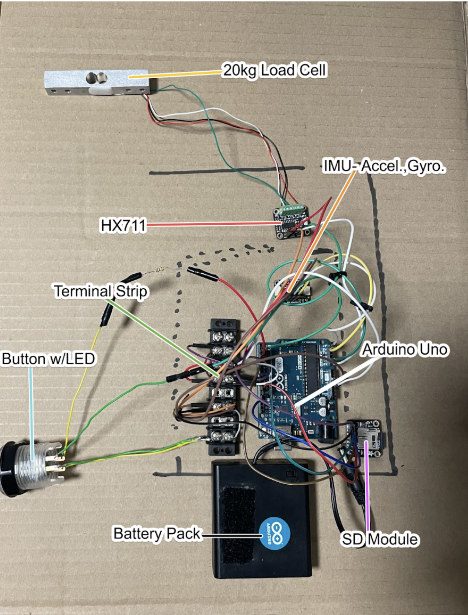
The DATA line connects to pin 3 on the Arduino while SCK connects to pin 2 and then 5V and GND pins are straightforward. The Arduino code is also on Github and starts with the example script from the HX711 library which is also on Github. To install downloaded ZIP libraries, navigate to Sketch>Include Library>Add .ZIP Library... and then add the ZIP file downloaded from Github.
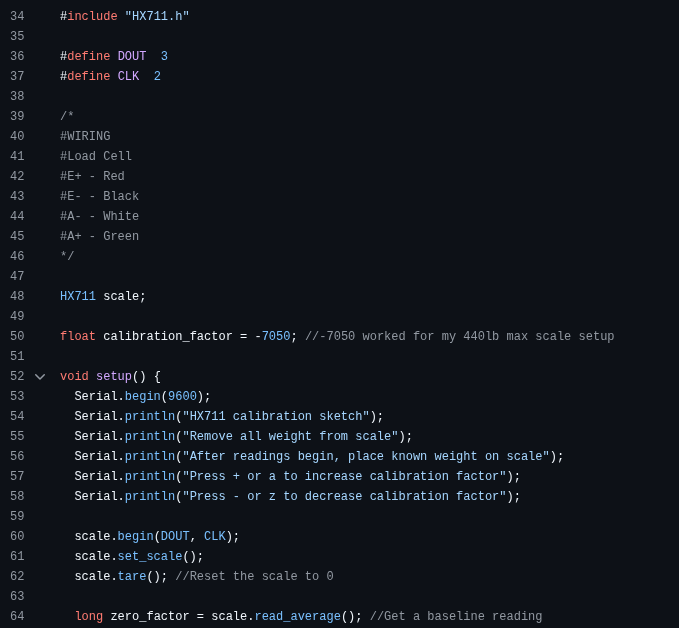
The screenshot above shows the #include <HX711.h> on line 34 which imports the HX711 library and then the rest of the setup sets up pins 2 and 3 for the strain gauge. There are also lines of code used to setup Serial communication so that you can see the output of the scale and also change the calibration factor by pressing a and z or + and - to either inrease or decrease the scale factor.

